Escaping the Algorithmic Echo Chamber: Reclaiming Your Reading Sovereignty with RSS
Have you ever stopped to consider how much of your thoughts, emotions, and worldview actually come from your own active observation, versus what’s simply “fed” to you by algorithms?
Caitlin Johnstone, in her article “It’s Getting Harder and Harder to Preserve Our Mental Sovereignty”, makes a stark point: the fiercest battles of our modern age aren’t fought on battlefields, but right here, in our minds.
Corporations and algorithmic engines don’t care if your thoughts are independent. They only care about your attention. To keep you hooked, they trap you in a comfort zone built on “For You” recommendations, constantly spoon-feeding you information designed to trigger anger, anxiety, or fleeting pleasure.
When you get used to passively consuming articles, much like endlessly scrolling through short videos, you’ve essentially surrendered your reading sovereignty. Over time, your worldview isn’t something you constructed; it’s something the algorithm customized for you. You think you’re seeing the world, but in reality, you’re only seeing the world the algorithm wants you to see.
Sound familiar? Perhaps you’ve experienced these moments:
- Vanishing Subscriptions: You follow a favorite blogger or public account, yet rarely see their updates on the platform. Only when you actively search for their account do you realize the system simply wasn’t pushing their content to you. Platforms, after all, have their own interest-driven algorithms.
- The Attention Black Hole: You just wanted to open an app for one specific news item, but then you’re sucked into the colorful vortex of “For You” recommendations. An hour later, after endless scrolling, you realize you’ve completely forgotten what you originally opened the app for.
- The Weary Patrol: Your beloved content is scattered everywhere: Bilibili videos, WeChat articles, Zhihu columns, plus a few independent websites. Simply opening each app to check for updates every day is exhausting.
If these scenarios resonate, you’re not alone. In this era, our attention is being “hijacked” by algorithms.
Today, I want to introduce you to a tool that sounds ancient (it was born over 20 years ago), yet feels incredibly precious in our current landscape: RSS. It’s like a key, helping you escape the algorithmic cage and reclaim your own “reading sovereignty.”
What Exactly is RSS?
RSS stands for Really Simple Syndication. Don’t let the tech jargon intimidate you. Just think of it as your “personal digital butler.”
The way we consume online content now is like “shopping at a mall”: you have to physically walk into each store (open different apps), endure pushy salespeople at the entrance (various ads and recommendation pop-ups), just to see what you want.
RSS, however, is your “exclusive private postman.”
You simply tell this postman the “addresses” of the “stores” you want to follow. Every day, they’ll patrol the internet for you. As soon as these stores stock new items (update their articles), the postman immediately bundles them up and delivers them directly to your doorstep.
You no longer need to wander through the mall, nor deal with aggressive salespeople. You simply sit at home, open your mailbox, and all the content you care about is neatly waiting for you.
Why Even Non-Techies Need RSS
Even if you’re not a programmer or tech-savvy, RSS remains your best defense against algorithms:
Absolute Serenity (Noise Reduction): In an RSS reader, there are no ads, no “trending topics,” no “For You” sections, and no comment section squabbles. Only pure text and images. It’s like stepping from a noisy marketplace into a quiet study; you can finally focus and finish an article.
Compounding Efficiency (Aggregation): You can aggregate content sources from various platforms into one place. What used to require switching between 5 apps can now be consumed in one, just like scrolling through a single social media feed.
You’re the Editor-in-Chief (Control): This is the most crucial point. When you hand over the power of “what to read” to an algorithm, you’re also surrendering the power of “what to think.” With RSS, you won’t see “hot trends across the web.” All content is personally selected and subscribed to by you. You won’t encounter “throttling” or “blocking”; every update is faithfully delivered in chronological order.
Using RSS is practicing one of the rarest skills in this era: information filtering.
When you manually add an RSS link, you’re forced to ask yourself: “Is this source trustworthy?” “Can this author’s perspective inspire me?” “Do I genuinely need to follow this content?”
This continuous self-questioning is how you train your mental sovereignty.
A Step-by-Step Guide: 3 Minutes to Your RSS Journey
Enough talk, let’s dive in. We’ll use FeedMe (a great Android option) or NetNewsWire (for iOS) as examples. The whole process takes just three steps.
Step 1: Find Your “Mailbox” (Download a Reader)
First, you need an app that can receive your “mail.”
Android Users: I recommend FeedMe (free, clean, no ads, no account registration required).

You can download it from the Google Play Store, or click the GitHub official link above. Alternatively, scan/recognize the QR code below to download the compressed installation package.

Apple Users: I recommend NetNewsWire, which is also free and minimalist.

Step 2: Get the “Address” (Copy the RSS Link)
Remember those “store addresses” I mentioned? On the internet, these are called RSS links. For this demonstration, we’ll use the Hacker Digest public account’s corresponding website as an example link (long-press to copy):
https://www.luznest.com/index.xml
Step 3: Subscribe (Start Reading)
If you’re using an Android phone:
Open your newly downloaded and installed FeedMe app. The interface appears as shown on the left. Follow the red numbers to select settings: Local -> Local RSS.

After selecting Local RSS, you need to add content yourself. In the sidebar, you’ll see a Subscriptions option (Subscriptions in the left image below, red number 1). Then you’ll see the interface on the right, click the "+" icon for “Subscription” (add subscription, red number 2).

In the figure on the bottom left, at position 1, paste the link you just copied:
https://www.luznest.com/index.xml. Click search or confirm (red number 2). Then the interface on the right will pop up. Generally, the title is automatically filled; if not, you can fill one in yourself, then click the Add button (ADD, red number 4).
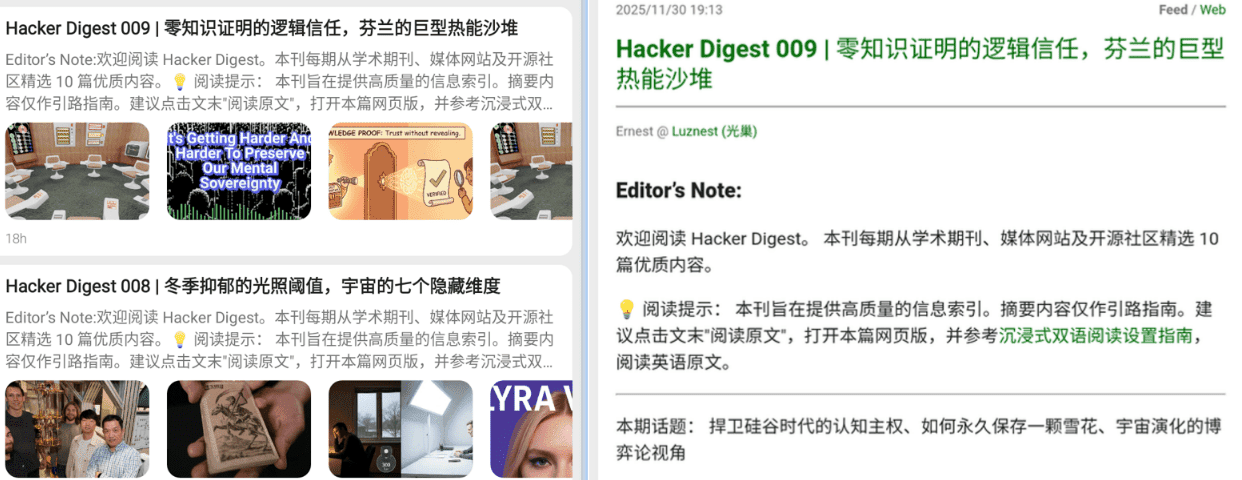
Witness the magic: You’ll find that FeedMe instantly fetches the article content from this link. Click into it, and you’ll see cleanly formatted text. From now on, whenever this website updates, FeedMe will automatically notify you, and you’ll never have to refresh the page repeatedly again.

If you’re using an iPhone or iPad, it’s even simpler. Just search for and download NetNewsWire from the App Store. The usage is similar.
Open NetNewsWire. The interface shown on the bottom left appears. We first need to add an account. Click Settings (red number 1), then in the pop-up interface, select Add Account (red number 2).

In the settings shown on the bottom left, select On My iPad (red number 1). In the pop-up interface, fill in the account name (I filled in Ernest; you can fill in any other account name), then select Add Account again (red number 3).

Go back to the main interface. You’ll see an additional account named Ernest (or whatever account name you just entered) compared to the initial entry interface. At this point, the “+” sign opposite the gear icon changes from gray to black, indicating that RSS sources can now be added. Click it, then select Add Feed (red number 1). In the pop-up window, fill in the RSS feed link (in the example, it’s
https://www.luznest.com/index.xml, position red number 2). Then fill in the RSS name, which is Hacker Digest here. Finally, click Add (red number 4).
Then you’ll see the content of this RSS feed neatly arranged in the window!

Here are some other Chinese RSS sources: FeedX – RSS Full-Text Subscription. You can choose your favorite RSS sources and try adding them using the steps above.
Conclusion
RSS isn’t about stuffing all the world’s information into your phone; on the contrary, it’s about subtraction. In this era where algorithms are omnipresent, staying clear-headed is an act of defiance.
RSS might not make you more entertained, but it helps you do something far more important: ensure that what you read every day is what you chose; ensure that your thoughts still belong to you.
In this age of information overload, what we need to do isn’t to consume more, but to only consume what’s worth consuming.
Try turning off those anxiety-inducing apps. Put a few blogs and columns you genuinely love into an RSS reader. You’ll find that reclaiming control over your reading feels incredibly free and light.
From today, strive to be the master of your own information world.